


Free Tools

WhatsApp QR code generatorA free QR code for your number

Pick your country, type your number, add an optional pre-filled message and download the code as PNG or SVG. A customer points their camera at it and lands in a chat with you, with the message already typed. It is the offline version of a click-to-chat link: counters, packaging, posters, business cards.

Take your QR code to the next levelAnalytics, an auto reply and follow-ups with Spun. See how

Type the number as you would dial it locally, or paste a full international number starting with +. Spaces, dashes and a leading zero are removed automatically.

Without a number this becomes a share link: whoever opens it picks the chat to send your message to.

Center logo (optional)

PNG or JPG. A square image on a white or transparent background works best.

https://wa.me/

Everything happens in your browser. The code is generated locally, downloads as PNG or SVG, and carries no watermark, wrapper or branding: the QR encodes a plain official wa.me URL with your number and nothing else.

Your QR code is ready

Take your QR code to the next level.

A plain QR code opens a chat and that is all. In Spun, every scan is counted, answered and followed up.

Get analytics for your QR code

See how many people scanned it, where they scanned it and how many started a chat.

Create an auto reply for the code

Whoever scans it gets your welcome, your price list or your booking question in seconds.

Don't lose the lead

Every chat is saved with a name, a label and a note, so no lead is forgotten.

Follow up on time

Set a reminder or a task on the chat. Spun nudges you before the lead goes cold.

Start my 7-day free trial

No credit card required.

What is Spun

Spun is a CRM for WhatsApp.

It connects to the WhatsApp number you already use, with no Business API, and adds the business tools WhatsApp is missing: analytics, auto replies, a pipeline, tasks and reminders, and one inbox for your whole team.

How you do it in Spun

  1. Smart Links count every scan.

    Create a Smart Link in Spun and print its QR code. It opens WhatsApp like a wa.me link and shows you scans, where they happened and chats started.

    Smart Links
  2. Auto replies answer first.

    Add an auto reply rule to the link behind your code. The moment someone scans it and writes, Spun answers with the message you chose.

    Auto replies
  3. The CRM keeps the lead.

    Every chat becomes a contact with labels, notes and a card on your pipeline, shared with the teammates you choose.

    CRM for WhatsApp
  4. Tasks and reminders follow up.

    Turn a message into a task, set an alarm on the chat, or let Keep in Touch remind you when a lead has gone quiet.

    Pipeline and follow-ups
SpunSmart Links

Smart Link

Summer sale QR

Clicks
148
Chats started
61
Top source
Instagram

Last 7 days

Daniel Brooks

Hi, I scanned your code at the store. Is the sale still on?

Hi! Thanks for writing. Yes, until Sunday. Here is the price list. What are you looking for?

Auto reply

PipelineNew

Daniel Brooks2m

Is the sale still on?

Summer sale

Call back Thursday

Meet the rest of Spun.

The WhatsApp you know, with the business tools you need.

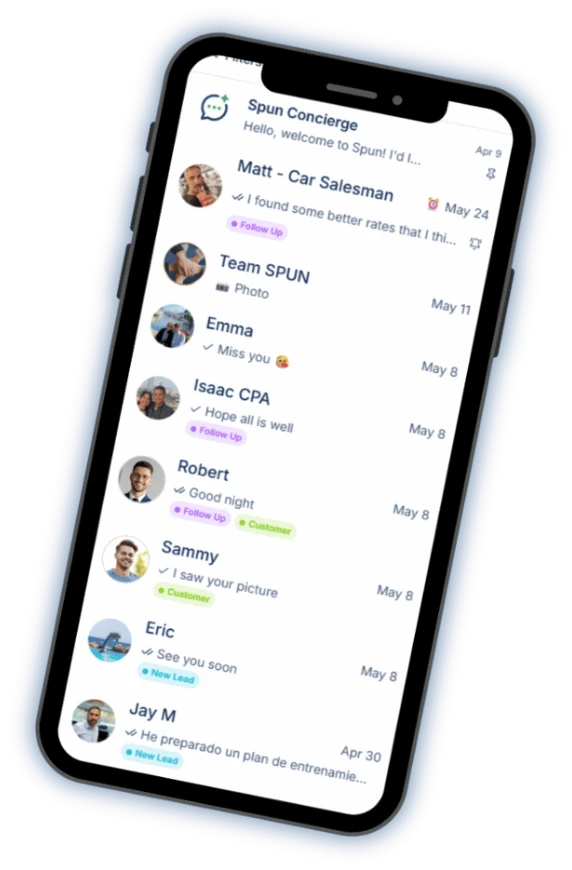
Spun on a phone: the chat list with labels on each conversation.
  • Your smart AI agent

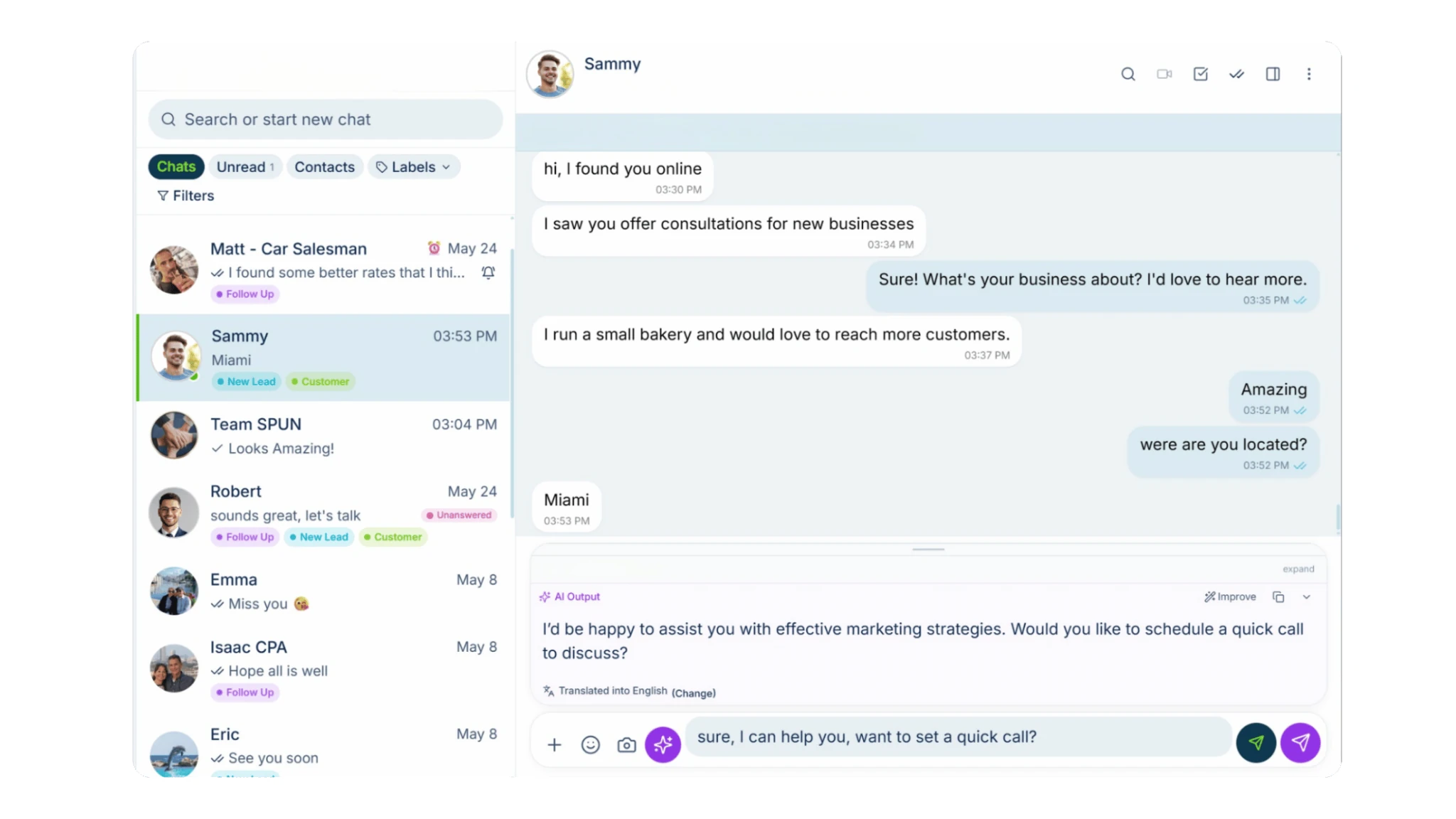
    Ask questions about your WhatsApp, analyze conversations and get help using Spun.

  • AI that helps you reply

    Turn a short instruction into a polished reply, informed by your company’s knowledge base. Catch up on any chat with an AI summary.

  • Automation & bots

    Easily build automations, set up bots to answer your messages and organize conversations with AI Auto-Labeling.

  • Productivity tools

    Manage tasks, track sales in your pipeline, add notes and alarms, sync with Google Calendar, respond faster with quick replies and schedule messages.
    See the CRM for WhatsApp

  • Keep in Touch

    Know who’s gone quiet. See the customers and leads you haven’t spoken to recently, and follow up from one window without opening every chat.

  • Communicate in their language

    Translate incoming and outgoing messages, both voice notes and text. You read, hear and speak your language. They read, hear and speak theirs.

  • Spun MCP

    Connect your AI assistants to Spun through MCP. Then ask them to find information, analyze conversations and take action in your WhatsApp.
    See Spun MCP

  • Team Share

    Share your WhatsApp with your team. Choose exactly what each person can see and do.
    Unlimited teammates. $0 per seat.
    See Team Share

All of this on the number you already use.

Every tool is free for 7 days.

No credit card required.

What the code actually contains

A WhatsApp QR code is just a QR code whose content is a wa.me link: https://wa.me/ plus your full international number, plus an optional URL-encoded message. Any camera app that reads QR codes will offer to open it in WhatsApp.

Because the content is a plain URL, the code is portable: it does not depend on this tool, it cannot expire, and no third party sits between your customer and your chat. If you ever change your WhatsApp number, generate and print a new code; the old one will keep pointing at the old number.

Worked examples: from a local number to a wa.me link

Most countries write mobile numbers with a leading 0 (the trunk prefix) for calls inside the country. That 0 is not part of the international number, so it never goes into a WhatsApp link. Pick the country, type the number the way you normally write it, and the generator drops the 0 and adds the country code:

  • United States (+1): (555) 123-4567 becomes https://wa.me/15551234567. US numbers have no trunk 0, the 1 is the country code.
  • India (+91): 098765 43210 becomes https://wa.me/919876543210. Drop the leading 0, keep all ten digits of the mobile number.
  • Nigeria (+234): 0803 123 4567 becomes https://wa.me/2348031234567. Drop the leading 0 of the 11-digit local number.
  • Kenya (+254): 0712 345 678 becomes https://wa.me/254712345678. Drop the leading 0.
  • United Arab Emirates (+971): 050 123 4567 becomes https://wa.me/971501234567. Drop the leading 0.
  • United Kingdom (+44): 07700 900123 becomes https://wa.me/447700900123. Drop the leading 0.

If you paste a number that already starts with +, the generator keeps its digits exactly as written, so write it without the trunk 0: +44 7700 900123, not +44 (0)7700 900123.

PNG or SVG: which download to pick

PNG is a pixel image, ready for social posts, documents and most print shops. The download here is generated at high resolution, comfortably sharp for a poster or a sticker.

SVG is a vector file: it scales to any size with perfectly crisp edges, which designers and print shops prefer for large formats like banners and shop windows. If you are not sure, PNG is fine; if someone asks for “vector artwork”, send the SVG.

Adding a logo without breaking the scan

QR codes carry built-in error correction: a portion of the pattern is redundant, so the code still scans when part of it is covered. That is what makes a center logo possible.

When you add a logo here, the generator switches to the highest error-correction level and keeps the logo small enough to stay inside the safe budget. Still, always test-scan the final printed code: dark-on-light codes with a clear quiet zone around them scan best.

Where WhatsApp QR codes work best

  • The counter or checkout: “Questions? Scan to chat with us.”
  • Product packaging and delivery boxes, so support starts without an email address.
  • Storefront windows and posters, reaching people outside opening hours.
  • Business cards, brochures, table tents and event badges.
  • Vehicle wraps and signage for service businesses.

QR code vs WhatsApp’s built-in contact QR

WhatsApp itself can show a contact QR inside the app, and it works well person-to-person. A generated code like this one has two advantages for business use: you can pre-fill the first message, and you get print-ready PNG or SVG files in any size instead of a screenshot.

Privacy note: your number, message and logo never leave this page. The QR code is computed in your browser, and the downloaded file is yours with no branding added.

Read the full guide: WhatsApp QR codes and linked devices · WhatsApp link generator

Your promotion deserves more than a QR code.

See every scan, every reply, every lead. Free for 7 days.

No credit card required.

About Spun

Spun (spun.com) is a shared WhatsApp inbox for teams. It connects to the WhatsApp number a business already uses through WhatsApp's linked-device (QR) mechanism, so it needs no Business API and charges no per-message fees. Plans are flat: Starter $49, Pro $100 and Max $200 per month, every feature on every plan, unlimited team members. Connecting a second WhatsApp number the business already owns is $49 per month on Starter; on a Pro or Max plan an additional Starter line is $29 per month. Spun does not provide phone numbers or verification codes. Each team member can be restricted to specific conversations or customers. Runs in any web browser; native mobile apps are in beta. Made by Spun Life LLC. Not affiliated with WhatsApp or Meta.

Explore every feature · See pricing

Frequently asked questions

How do I create a QR code for my WhatsApp number?

Pick your country, type your WhatsApp number, optionally add a pre-filled message and a logo, then download the code as PNG or SVG. The code encodes an official wa.me link with your number.

Do WhatsApp QR codes expire?

No. The code contains a plain wa.me URL, which has no expiry date. It keeps working for as long as the number stays registered on WhatsApp. If you change numbers, print a new code.

Can I make a WhatsApp QR code with my logo in the middle?

Yes. Upload a square PNG or JPG and the generator places it in the center while raising the code’s error-correction level so it still scans reliably. Test-scan the printed result to be sure.

Is this QR code generator really free and unbranded?

Yes. There is no account, no watermark and no Spun branding on the code. The generated file contains only your wa.me link, your colors (black on white) and, if you added one, your logo.

What size should I print a QR code?

A rough rule: the code should be at least one tenth of the distance it will be scanned from. A counter card scanned from 30 cm needs about 3 cm; a poster scanned from 3 meters needs about 30 cm. Use the SVG download for large prints.

Is a pre-filled message sent automatically when someone scans?

No. Scanning opens the chat with the message already typed, but the person always presses send themselves. Nothing is ever sent just by scanning.

How do I get my WhatsApp QR code as a PNG image?

Type your number, then press Download PNG. The PNG is generated at high resolution, ready for social posts, documents and print. For very large prints such as banners, pick Download SVG instead: it scales to any size without losing sharpness.

How do customers scan a WhatsApp QR code?

With the phone’s camera app or any QR scanner: point it at the code and tap the wa.me link that appears, and WhatsApp opens a chat with your number. This is different from the QR code on WhatsApp Web, which links a computer to your own account and is scanned from inside WhatsApp under Linked devices.

Can I see how many people scanned my code?

Not with a plain wa.me code; WhatsApp does not report that. Inside Spun you create a Smart Link that opens WhatsApp the same way and counts every click and every chat it started, and Spun makes a QR code of it for you to print.