


Free Tools

WhatsApp link generatorCreate a wa.me link with a message

Pick your country, type your number, add an optional pre-filled message and copy the link. A wa.me link opens a WhatsApp chat with you the moment someone taps it, even if they never saved your number.

Take your link to the next levelAnalytics, an auto reply and follow-ups with Spun. See how

Type the number as you would dial it locally, or paste a full international number starting with +. Spaces, dashes and a leading zero are removed automatically.

Your link

https://wa.me/

Without a number this becomes a share link: whoever opens it picks the chat to send your message to.

The link you get is a plain, official wa.me URL. Nothing is shortened, wrapped or tracked, so it will keep working for as long as WhatsApp exists and your number stays active.

Your link is ready

Take your link to the next level.

A plain link opens a chat and that is all. In Spun, every tap is counted, answered and followed up.

Get analytics for your link

See how many people tapped it, where they came from and how many started a chat.

Create an auto reply for the link

Whoever taps it gets your welcome, your price list or your booking question in seconds.

Don't lose the lead

Every chat is saved with a name, a label and a note, so no lead is forgotten.

Follow up on time

Set a reminder or a task on the chat. Spun nudges you before the lead goes cold.

Start my 7-day free trial

No credit card required.

What is Spun

Spun is a CRM for WhatsApp.

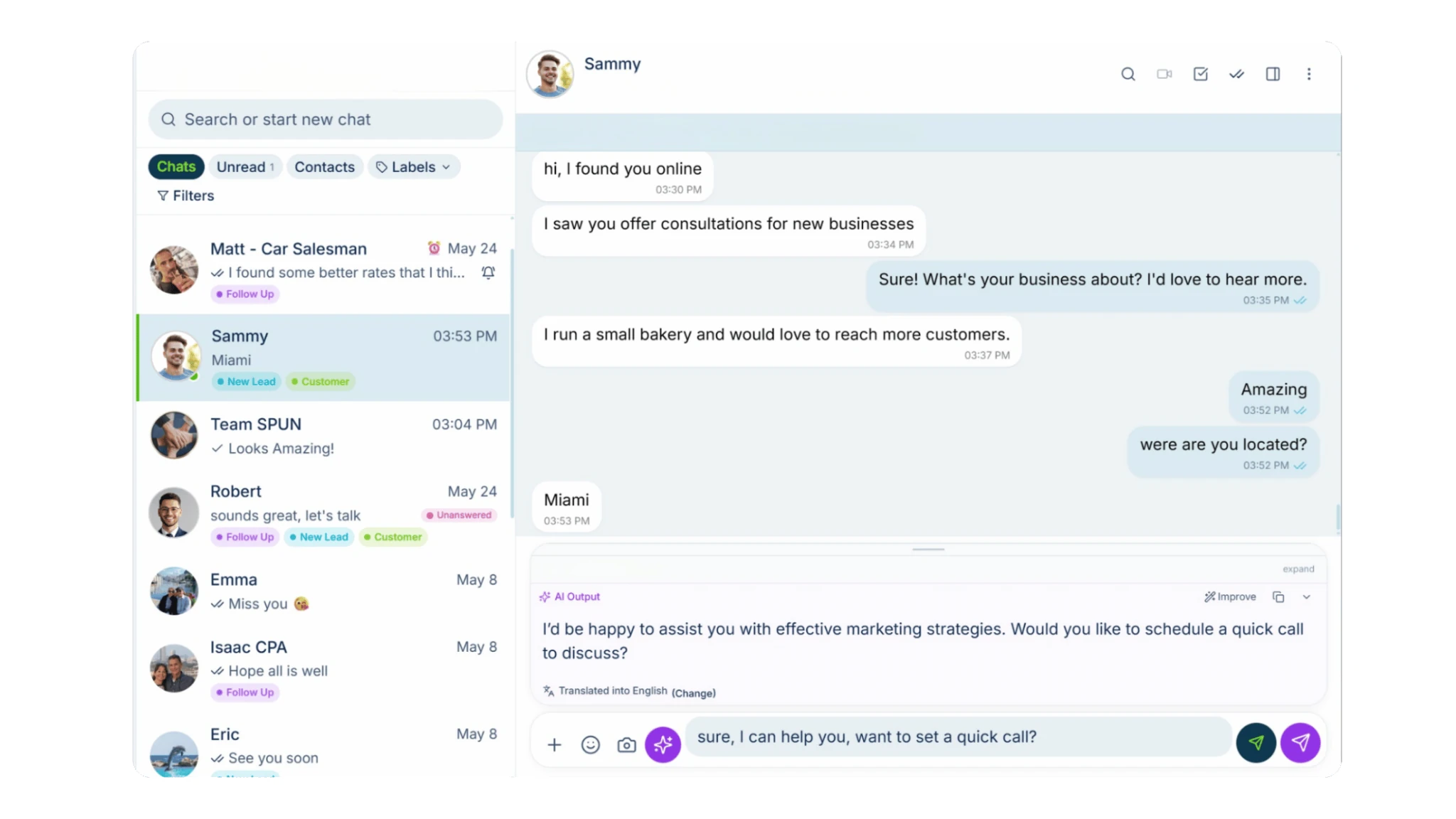
It connects to the WhatsApp number you already use, with no Business API, and adds the business tools WhatsApp is missing: analytics, auto replies, a pipeline, tasks and reminders, and one inbox for your whole team.

How you do it in Spun

  1. Smart Links count every tap.

    Create a Smart Link in Spun. It opens WhatsApp like a wa.me link and shows you clicks, sources and chats started. Print a QR code of it too.

    Smart Links
  2. Auto replies answer first.

    Add an auto reply rule to the link. The moment someone taps it and writes, Spun answers with the message you chose.

    Auto replies
  3. The CRM keeps the lead.

    Every chat becomes a contact with labels, notes and a card on your pipeline, shared with the teammates you choose.

    CRM for WhatsApp
  4. Tasks and reminders follow up.

    Turn a message into a task, set an alarm on the chat, or let Keep in Touch remind you when a lead has gone quiet.

    Pipeline and follow-ups
SpunSmart Links

Smart Link

Summer sale link

Clicks
148
Chats started
61
Top source
Instagram

Last 7 days

Daniel Brooks

Hi, I saw your post. Is the sale still on?

Hi! Thanks for writing. Yes, until Sunday. Here is the price list. What are you looking for?

Auto reply

PipelineNew

Daniel Brooks2m

Is the sale still on?

Summer sale

Call back Thursday

Meet the rest of Spun.

The WhatsApp you know, with the business tools you need.

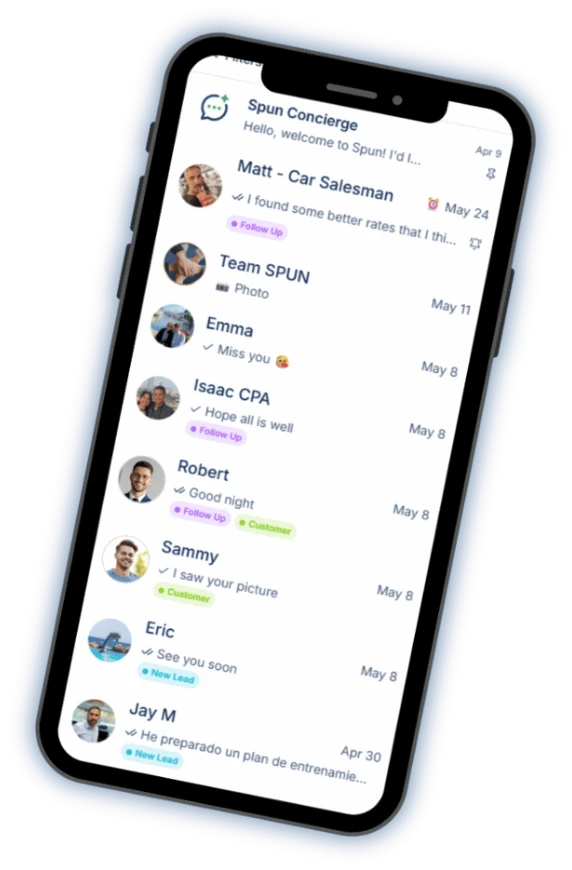
Spun on a phone: the chat list with labels on each conversation.
  • Your smart AI agent

    Ask questions about your WhatsApp, analyze conversations and get help using Spun.

  • AI that helps you reply

    Turn a short instruction into a polished reply, informed by your company’s knowledge base. Catch up on any chat with an AI summary.

  • Automation & bots

    Easily build automations, set up bots to answer your messages and organize conversations with AI Auto-Labeling.

  • Productivity tools

    Manage tasks, track sales in your pipeline, add notes and alarms, sync with Google Calendar, respond faster with quick replies and schedule messages.
    See the CRM for WhatsApp

  • Keep in Touch

    Know who’s gone quiet. See the customers and leads you haven’t spoken to recently, and follow up from one window without opening every chat.

  • Communicate in their language

    Translate incoming and outgoing messages, both voice notes and text. You read, hear and speak your language. They read, hear and speak theirs.

  • Spun MCP

    Connect your AI assistants to Spun through MCP. Then ask them to find information, analyze conversations and take action in your WhatsApp.
    See Spun MCP

  • Team Share

    Share your WhatsApp with your team. Choose exactly what each person can see and do.
    Unlimited teammates. $0 per seat.
    See Team Share

All of this on the number you already use.

Every tool is free for 7 days.

No credit card required.

How a click-to-chat link works

WhatsApp runs an official click-to-chat service at wa.me. A URL in the form https://wa.me/15551234567 tells WhatsApp to open a new chat with that number, on any device: on a phone it opens the app, on a desktop it opens WhatsApp Web or the desktop app.

Adding ?text= puts words into the visitor’s message box before they send. The visitor always presses send themselves, so a pre-filled message is a head start, not an automatic message. That is also why these links are safe to share anywhere: tapping one never sends anything by itself.

Getting the number format right

Most broken WhatsApp links are formatting problems. The number in a wa.me URL must be the full international number, digits only:

  • Include the country code (for example 1 for the US, 44 for the UK, 972 for Israel).
  • Drop the plus sign, spaces, dashes and parentheses. wa.me/+1 (555) 123-4567 does not work; wa.me/15551234567 does.
  • Drop the trunk zero many countries use for domestic dialing. A UK number written 07700 900123 becomes 447700900123.
  • Use the number that is actually registered on WhatsApp. A landline that was never verified on WhatsApp will open an empty screen.

Worked examples: from a local number to a wa.me link

Most countries write mobile numbers with a leading 0 (the trunk prefix) for calls inside the country. That 0 is not part of the international number, so it never goes into a WhatsApp link. Pick the country, type the number the way you normally write it, and the generator drops the 0 and adds the country code:

  • United States (+1): (555) 123-4567 becomes https://wa.me/15551234567. US numbers have no trunk 0, the 1 is the country code.
  • India (+91): 098765 43210 becomes https://wa.me/919876543210. Drop the leading 0, keep all ten digits of the mobile number.
  • Nigeria (+234): 0803 123 4567 becomes https://wa.me/2348031234567. Drop the leading 0 of the 11-digit local number.
  • Kenya (+254): 0712 345 678 becomes https://wa.me/254712345678. Drop the leading 0.
  • United Arab Emirates (+971): 050 123 4567 becomes https://wa.me/971501234567. Drop the leading 0.
  • United Kingdom (+44): 07700 900123 becomes https://wa.me/447700900123. Drop the leading 0.

If you paste a number that already starts with +, the generator keeps its digits exactly as written, so write it without the trunk 0: +44 7700 900123, not +44 (0)7700 900123.

Pre-filled messages and URL encoding

The text after ?text= must be URL-encoded: spaces become %20, question marks, ampersands and emoji have their own escape sequences. Unencoded text can cut your message off at the first special character, which is the second most common reason generated links misbehave.

This generator encodes the message for you, so what you type is exactly what the visitor sees pre-typed. Keep it short and give the visitor something to confirm, like “Hi! I’m interested in the apartment on Main St.”: it tells you which placement the chat came from and gives them a reason to press send.

Where a WhatsApp link earns its keep

Anywhere a customer might want to talk to you and a phone call feels heavy:

  • The contact button on your website, instead of a form nobody enjoys filling in.
  • Instagram, TikTok and X bios, where only one link is allowed and it should start conversations.
  • Email signatures, invoices and quotes, so a question becomes a chat instead of a reply-all.
  • Google Business Profile and online directories.
  • Offline: turn the same link into a QR code for packaging, receipts and counter displays.

Test it like a stranger

Before you publish the link, open it from a phone that does not have your number saved: that is exactly the state a new customer is in. Check that the right number comes up and the pre-filled text reads naturally.

Privacy note: this page builds your link locally in your browser. Your number and message are not sent to Spun or anyone else, and the finished link contains nothing except what you typed.

Read the full guide: Sending links on WhatsApp · WhatsApp QR code generator

Your promotion deserves more than a link.

See every click, every reply, every lead. Free for 7 days.

No credit card required.

About Spun

Spun (spun.com) is a shared WhatsApp inbox for teams. It connects to the WhatsApp number a business already uses through WhatsApp's linked-device (QR) mechanism, so it needs no Business API and charges no per-message fees. Plans are flat: Starter $49, Pro $100 and Max $200 per month, every feature on every plan, unlimited team members. Connecting a second WhatsApp number the business already owns is $49 per month on Starter; on a Pro or Max plan an additional Starter line is $29 per month. Spun does not provide phone numbers or verification codes. Each team member can be restricted to specific conversations or customers. Runs in any web browser; native mobile apps are in beta. Made by Spun Life LLC. Not affiliated with WhatsApp or Meta.

Explore every feature · See pricing

Frequently asked questions

How do I create a WhatsApp link for my number?

Use the format https://wa.me/ followed by your full international number with digits only, for example https://wa.me/15551234567. This generator does the formatting for you: pick your country, type the number, copy the link.

How do I add a pre-filled message to a WhatsApp link?

Append ?text= followed by the URL-encoded message, for example https://wa.me/15551234567?text=Hi%20there. The generator encodes the text automatically, including emoji and punctuation.

Does a wa.me link work if someone doesn’t have my number saved?

Yes. That is the point of click-to-chat: tapping the link opens a chat with your number even for people who never saved your contact. They see your name as you registered it on WhatsApp.

Do WhatsApp links expire or cost anything?

No. wa.me is a free official WhatsApp service, the link never expires, and it keeps working as long as the number stays registered on WhatsApp. This generator is also free and adds no tracking of its own.

Can I make a WhatsApp link without a phone number?

Yes. Leave the number empty and the generator produces https://wa.me/?text=... which opens WhatsApp’s share screen: the person who taps it chooses which chat to send your message to. Useful for “share this with a friend” placements.

What is the difference between wa.me and api.whatsapp.com/send?

No practical difference. wa.me/15551234567 is the short official form; https://api.whatsapp.com/send?phone=15551234567 is the long form seen in older documentation. Both open the same chat and both accept a text parameter.

How do I get my own WhatsApp link?

The WhatsApp Business app offers a ready-made short link under Settings, Business tools, Short link. For any number, business or personal, a plain wa.me link works too and you can build it yourself: https://wa.me/ followed by your number in international format, digits only, without the leading 0. A Nigerian number written 0803 123 4567 becomes https://wa.me/2348031234567, an Indian number written 098765 43210 becomes https://wa.me/919876543210. The generator above does it for any country.

Can I shorten a WhatsApp link?

A wa.me link is already short and shows exactly where it leads, which is why people trust it. You can put it behind a link shortener, but a shortened link hides the destination and some people and filters treat hidden destinations with suspicion. If you need something shorter to print, a QR code of the plain wa.me link usually works better.

Can I see how many people used my link?

Not with a plain wa.me link; WhatsApp does not report that. Inside Spun you create a Smart Link that opens WhatsApp the same way and counts every click and every chat it started. You can print a QR code of the Smart Link too.