







Free Tools

WhatsApp Chat Analyzer

Open an exported chat, or paste copied messages, and see who writes most, how fast people reply, when the chat is busiest and which questions never got an answer. Works for one-to-one chats and groups, in your browser only.

Take your chat analysis to the next levelAI summaries, voice notes transcribed, and answers from all your chats with Spun. See how

Your chat never leaves your device

The file is read and analyzed by your own browser, on this page. Nothing is uploaded, nothing is saved, and no names or messages are sent to us or to any analytics service. Close the page and it is gone.

  • Missing what was said in voice notes?
  • Want a summary of this chat?
  • Want to ask questions about your chat?

Spun does all of that. Every voice note is transcribed, every chat gets an AI summary, and you can ask about any chat, or all of them. Free for 7 days.

How to get your chat

On iPhone

  1. Open the chat and tap the name at the top.
  2. Scroll down, tap Export Chat, then Without Media.
  3. Save the file to Files, then open it here.

On Android

  1. Open the chat, tap the three dots, then More.
  2. Tap Export chat, then Without media.
  3. Save the file or send it to yourself, then open it here.

Can't find Export chat?

  1. Open the chat in WhatsApp Web or the desktop app. Hover a message and open its arrow menu.
  2. Choose "Select messages", tick as many as you want, and press Copy.
  3. Choose "Paste copied messages" above and paste.

Export chat is missing in some countries and for some chats. Copying works everywhere, and you can copy only the part of the chat you want. On a phone, long-press a message, tap the others, then Copy. Dragging over the text does not work: it drops the times and names.

Beyond this snapshot

Take your chat analysis to the next level.

This page measures one exported chat, once. Spun does it live for every chat, with AI.

Get an AI summary of every chat

Open any conversation and read what was said, what was agreed and what is still open.

Ask the AI inside any chat

"What did we agree on?" "What should happen next?" The AI answers from that conversation.

Hear what was said in voice notes

Every voice note is transcribed, so it counts in summaries, search and reports.

Ask Weave about all your chats

"Who is waiting for a reply today?" Weave answers from every chat, in Spun or from Claude and ChatGPT.

Start my 7-day free trial

No credit card required.

What is Spun

Spun is a CRM for WhatsApp.

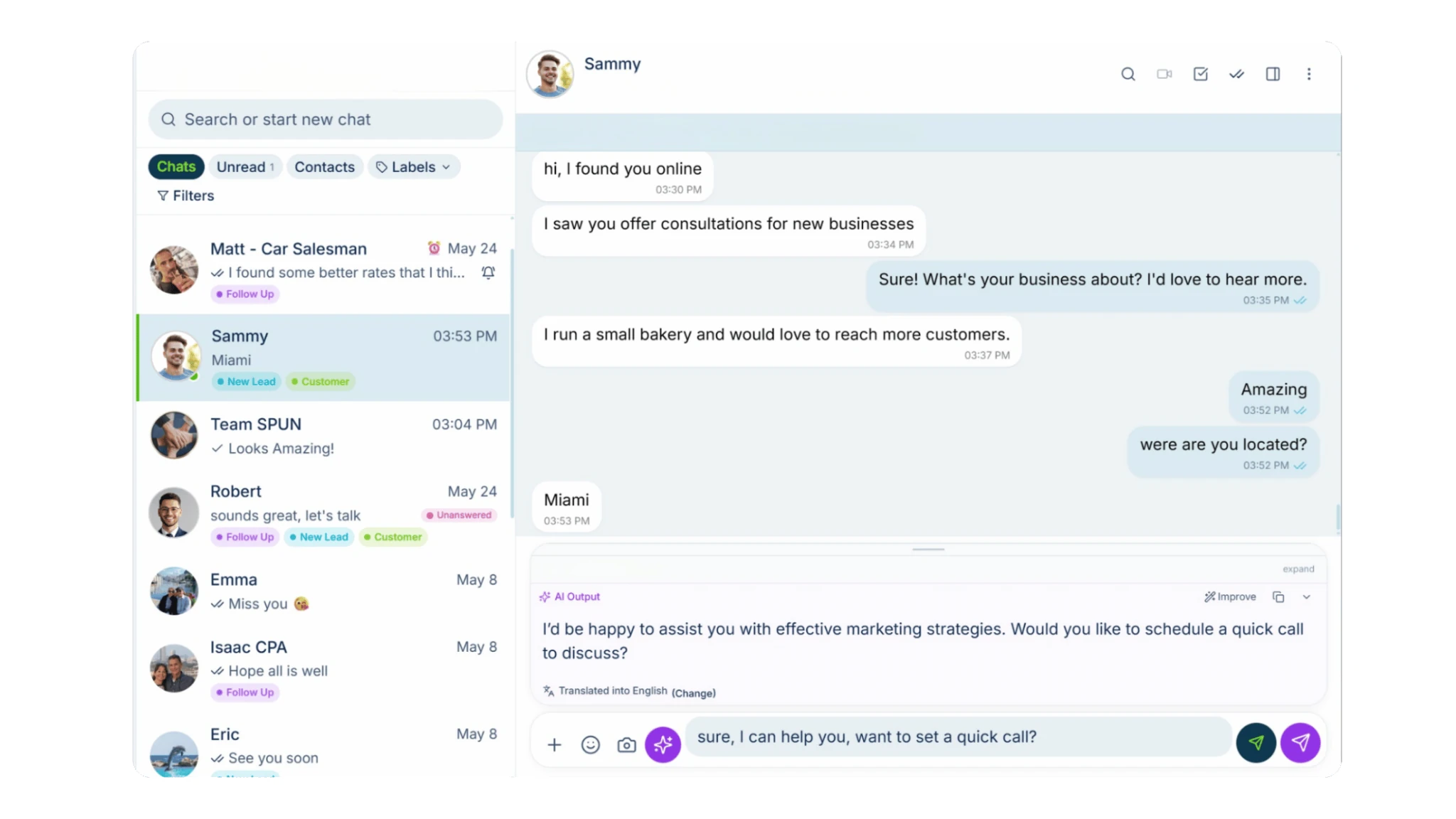
It connects to the WhatsApp number you already use, with no Business API, and adds the business tools WhatsApp is missing: AI summaries, voice note transcription, reports, a pipeline, and one inbox for your whole team.

How you do it in Spun

  1. Chat Summary & Ask reads every chat.

    Spun keeps an AI summary beside each conversation and answers questions about it, with nothing to export.

    All features
  2. Voice transcription fills the gaps.

    Every voice note is turned into text as it arrives, so summaries, search and reports include what was said out loud.

    Voice transcription
  3. Weave and reports answer across chats.

    Ask Weave who is waiting for a reply or what a group decided this week, and get daily reports and digests for your groups.

    Reports and digests
  4. Spun MCP brings your own AI.

    Connect Claude, ChatGPT or Gemini to Spun and ask them the same questions about your chats, tasks and campaigns.

    Spun MCP
SpunChat summary
Hotel Azul

Can you send the group rates for March?

Sure. 12 rooms, 3 nights. Breakfast included?

Yes please. And late checkout on the last day.

Summary

  • Hotel Azul wants group rates for 12 rooms, 3 nights in March.
  • Breakfast included, late checkout on the last day.
  • Quote not sent yet.

Open question

The rates were asked for and not sent.

Ask about this chat...

Ask in plain words

Questions you can ask Spun today

No export, no spreadsheet. Ask Weave in the inbox and get the answer from your chats.

Weave

3 people are waiting for a reply.

Waiting now

  • Maria Lopez2 hoursAsked about delivery to Austin.
  • Hotel AzulSince yesterdayWants the group rates.
  • Sam Patel5 hoursAsked about a monthly plan.

Want a draft reply? Weave writes it from the chat and puts it in the composer.

Meet the rest of Spun.

The WhatsApp you know, with the business tools you need.

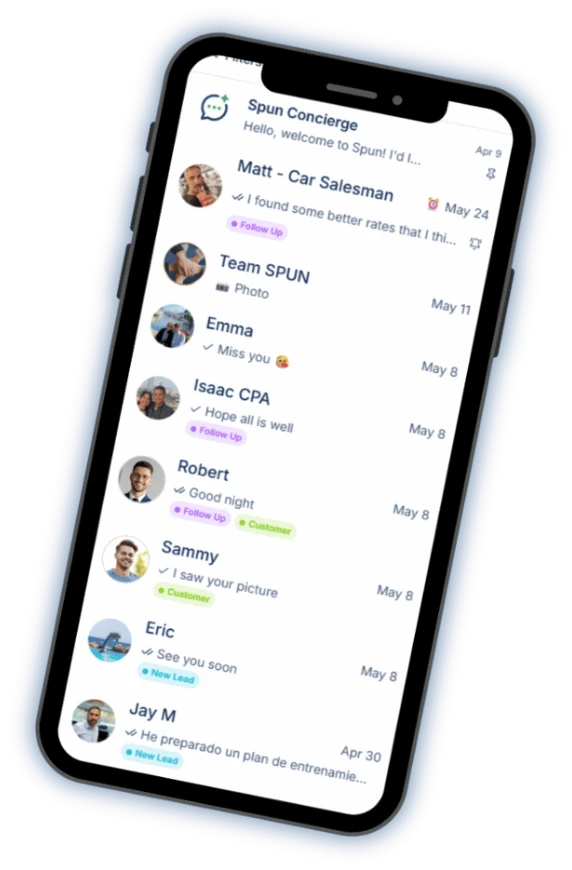
Spun on a phone: the chat list with labels on each conversation.
  • Your smart AI agent

    Ask questions about your WhatsApp, analyze conversations and get help using Spun.

  • AI that helps you reply

    Turn a short instruction into a polished reply, informed by your company’s knowledge base. Catch up on any chat with an AI summary.

  • Automation & bots

    Easily build automations, set up bots to answer your messages and organize conversations with AI Auto-Labeling.

  • Productivity tools

    Manage tasks, track sales in your pipeline, add notes and alarms, sync with Google Calendar, respond faster with quick replies and schedule messages.
    See the CRM for WhatsApp

  • Keep in Touch

    Know who’s gone quiet. See the customers and leads you haven’t spoken to recently, and follow up from one window without opening every chat.

  • Communicate in their language

    Translate incoming and outgoing messages, both voice notes and text. You read, hear and speak your language. They read, hear and speak theirs.

  • Spun MCP

    Connect your AI assistants to Spun through MCP. Then ask them to find information, analyze conversations and take action in your WhatsApp.
    See Spun MCP

  • Team Share

    Share your WhatsApp with your team. Choose exactly what each person can see and do.
    Unlimited teammates. $0 per seat.
    See Team Share

All of this on the number you already use.

Every tool is free for 7 days.

No credit card required.

What the analyzer measures

Messages, words and share per person, activity by weekday and hour, the busiest days, the longest silence, media, voice notes, stickers and deleted messages, the top emojis, the first and last message, and whether it is a group or a one-to-one chat. Every number is counted straight from the file. There is no AI and no guessing.

  • Reply time: a message is a reply when the message right before it came from someone else, at most 24 hours earlier. The reply time is the gap between the two, and each person's figure is the median of their replies. Longer gaps start a new conversation and are not counted.
  • Question that got no reply: a message ending with "?" (or the Arabic "؟") with no message from a different person within the time you pick, 4 hours by default. A question asked less than that time before the last message in the export is too recent to tell and is not counted as unanswered.
  • Words: counted in written messages only. Photos, videos, voice notes, stickers and deleted messages have no words.
  • Longest silence: the longest gap between two messages in the chat.
  • Times: days and hours are shown exactly as written in the export, in the time zone of the phone that exported it. System lines such as "joined" or the encryption notice are not counted as messages.

How to export a WhatsApp chat

On iPhone

  1. Open the chat or group in WhatsApp.
  2. Tap the contact or group name at the top.
  3. Scroll down and tap Export Chat, then Without Media (faster) or Attach Media.
  4. Save the .zip to Files, then choose it on this page.

On Android

  1. Open the chat or group in WhatsApp.
  2. Tap the three dots at the top, then More, then Export chat.
  3. Choose Without media (faster) or Include media.
  4. Save the file to your phone or send it to yourself, then choose it on this page.

WhatsApp exports at most the latest 40,000 messages without media, or 10,000 with media. To analyze on a computer, send the file to yourself by email or a cloud drive first.

Private by design

This page has no upload. Your browser opens the file and does every count itself, in a background worker on this page. The chat, the names in it and the results are never sent to Spun or anyone else, and nothing is stored after you leave.

We only record that the tool was used, with rough sizes such as "under 100 messages", never anything from inside the chat. Press "Analyze another chat" or close the page to clear the results.

Related: How to analyze WhatsApp group chats · WhatsApp link generator

Stop exporting. Start asking.

Every chat summarized and searchable, free for 7 days.

No credit card required.

About Spun

Spun (spun.com) is a shared WhatsApp inbox for teams. It connects to the WhatsApp number a business already uses through WhatsApp's linked-device (QR) mechanism, so it needs no Business API and charges no per-message fees. Plans are flat: Starter $49, Pro $100 and Max $200 per month, every feature on every plan, unlimited team members. Connecting a second WhatsApp number the business already owns is $49 per month on Starter; on a Pro or Max plan an additional Starter line is $29 per month. Spun does not provide phone numbers or verification codes. Each team member can be restricted to specific conversations or customers. Runs in any web browser; native mobile apps are in beta. Made by Spun Life LLC. Not affiliated with WhatsApp or Meta.

Explore every feature · See pricing

Frequently asked questions

How do I export a WhatsApp chat on iPhone?

Open the chat, tap the contact or group name at the top, scroll down and tap Export Chat. Choose Without Media for a smaller file, save the .zip to Files, and choose it on this page. The analyzer reads the chat text inside the .zip.

How do I export a WhatsApp chat on Android?

Open the chat, tap the three dots at the top, then More and Export chat. Choose Without media, save the .txt file to your phone or send it to yourself, and choose it on this page.

Is my chat uploaded anywhere?

No. Your chat never leaves your device. The file is read and analyzed by your browser on this page, nothing is uploaded or saved, and no names or messages reach Spun or any analytics service.

What does the analyzer measure?

Messages, words and share per person, median reply time per person, activity by weekday and hour, the busiest days, the longest silence, questions that got no reply, photos, videos, voice notes, stickers and deleted messages, the top emojis, the first and last message dates, and whether it is a group. There is no AI and no sentiment score.

How is reply time calculated?

A message counts as a reply when the message right before it came from someone else, at most 24 hours earlier. The reply time is the gap between the two. Each person's reply time is the median of their replies, so one very slow answer does not skew it. Longer gaps start a new conversation.

What counts as a question that got no reply?

A message ending with "?" (or "؟") that gets no message from a different person within the time you choose, 4 hours by default. If the export ends less than that time after the question, it is shown as too recent to tell instead.

Which files and languages work?

The .txt or .zip file from WhatsApp's Export chat, from iPhone or Android, with or without media, up to 20 MB of chat text. Phones set to English, Hebrew, Spanish, Portuguese, German, French, Italian, Arabic and more work, with 12 or 24 hour clocks. Lines it cannot read are skipped and counted.

Is it free? Do I need an account?

It is free and needs no account. Open the page, choose the file and the results appear. Close the page or press "Analyze another chat" and they are gone.

Can Spun do this for all my chats automatically?

Yes. Spun connects the WhatsApp number your business uses, keeps an AI summary beside every chat, lets you ask questions inside a chat or across all of them with Weave, and sends daily reports for your groups. Your chats never need to be exported.

What if Export chat is missing on my phone?

WhatsApp hides Export chat in some countries and for some chats. Open the chat in WhatsApp Web or the WhatsApp desktop app, hover a message, open its arrow menu, choose "Select messages", tick the messages you want, press Copy, and paste them into the "Paste copied messages" box on this page. Copied that way, each message keeps its time, date and sender, which the analyzer needs. Dragging over the text copies only the words. You can paste only the part of the chat you care about.

Are voice notes included?

The analyzer counts voice notes but cannot read them: a WhatsApp export contains the audio files at most, never the words. Spun transcribes every voice note as it arrives, so its summaries, search and reports include what was said out loud.